Git Branching Strategies Explained: Main, Develop, and Feature Branches
Oct 25, 2025
🚀 Part of the CodeInteliG DevOps Series
1️⃣ Git Branching Strategies Explained (You’re here) — Establish workflow structure
2️⃣ How to Properly Do Releases in GitHub — Standardize tagging and reporting
3️⃣ Automating Releases with GitHub Actions — Bring it all to life
4️⃣ 10 GitHub Actions Every Engineering Team Should Automate in 2025 — Scale with automation
🧠 Introduction
Every engineering team needs a branching strategy — but few realize how much it affects release stability, delivery speed, and analytics accuracy.
Without structure, merges get messy, features drift out of sync, and release reporting becomes guesswork.
In this article, we’ll break down the most common Git branching models — Git Flow, Trunk-Based Development, and Main–Develop–Feature — and explain why the last one strikes the best balance for enterprise SaaS teams.
⚙️ Why Branching Strategy Matters
A clear branching model isn’t just for developer sanity — it’s the foundation of traceability and measurement.
Your cycle time, delivery time, and deployment frequency metrics all depend on branch hygiene.
If your team commits directly to main, or inconsistently merges features, your analytics (and your releases) will always be unreliable.
✅ Consistent branch structure = consistent data.
🌳 Common Git Branching Models
1️⃣ Git Flow (Classic)
Structure:
Pros:
✅ Stable for large teams
✅ Easy parallel development
✅ Ideal for versioned releases
Cons:
⚠️ Heavy merge overhead
⚠️ Slows continuous delivery
⚠️ Not suited for small, frequent releases
Best For:
Large or legacy enterprise systems with long release cycles.
2️⃣ Trunk-Based Development
Structure:
Pros:
✅ Extremely fast integration
✅ Ideal for continuous deployment
✅ Simplifies automation
Cons:
⚠️ Requires strict CI/CD discipline
⚠️ Demands high test automation coverage
Best For:
High-velocity teams deploying multiple times per day.
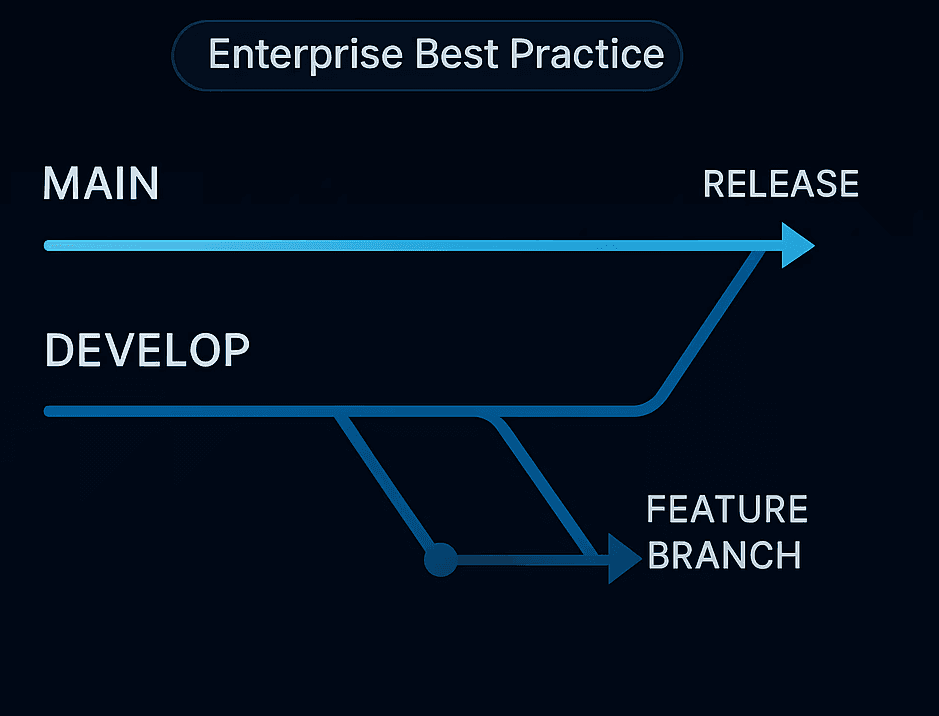
3️⃣ Main–Develop–Feature (Hybrid Approach) ✅ Recommended for Enterprise Teams
Structure:
Why it’s ideal:
This hybrid blends the best of Git Flow and Trunk-Based models.
Developers work in isolated feature branches for clarity.
develop acts as a staging ground for QA and integration.
main stays clean and production-ready.
Release automation and analytics (like in CodeInteliG) easily track changes per repository.
Best Practices:
Keep feature branches short-lived (merge within a sprint).
Protect main with required reviews and checks.
Use GitHub Actions to automatically tag releases after merges into main.
🧱 Example Workflow
🧩 Typical Flow:
Developer creates feature/add-subscription-billing from develop.
Commits and opens a PR → merged into develop after review.
QA verifies on develop.
Merge into main triggers a GitHub Release.
Release tag (e.g., v3.2.1) marks deployment and feeds analytics.
👉 You can link this flow to How to Properly Do Releases in GitHub →
🔗 How Branching Impacts Reporting
If branches aren’t standardized:
Cycle time (branch → merge) becomes inconsistent.
Delivery time (merge → release) breaks across repos.
Deployment frequency can’t be tracked accurately.
By adopting a consistent Main–Develop–Feature structure, your reporting becomes accurate, traceable, and analytics-ready.
With consistent structure, CodeInteliG can:
Detect feature completion precisely.
Attribute release timing correctly.
Correlate development velocity across repositories.
💡 CodeInteliG Insight
Engineering analytics depend on structure.
That’s why CodeInteliG automatically maps branches across repositories, linking them to pull requests and releases for accurate reporting.
By standardizing branching, you enable CodeInteliG to:
Track cycle time per branch type
Visualize merge patterns
Calculate delivery metrics per repo or environment
🧭 Clear structure means clear insights — that’s the foundation of developer intelligence.
🧰 Best Practices Recap
✅ Use Main–Develop–Feature for scalable enterprise workflows.
✅ Automate merges and tagging via GitHub Actions.
✅ Keep feature branches short-lived and reviewed.
✅ Link releases to repository tags for accuracy.
✅ Protect your main branch to maintain production integrity.
✨ Conclusion
Branching isn’t just version control — it’s visibility control.
A clean Git structure keeps development fast, releases stable, and analytics precise.
Start by adopting the Main–Develop–Feature model.
Then automate it — and let CodeInteliG bring your Git data to life.
Next Read: How to Properly Do Releases in GitHub →
👉 Join Now →